New
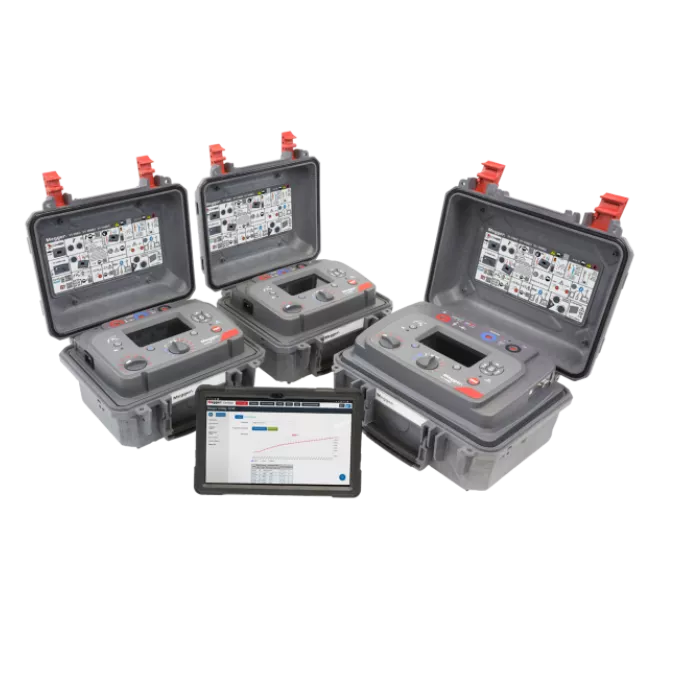
Expert 5 kV, 10 kV and 15 kV insulation resistance testers
Adaptive filtering and 8 mA noise immunity ensure stable readings in substations up to 1000 kV. The filter reacts instantly to suppress spikes.
RE>Act™ shows when insulation is ready to retest, avoiding errors from residual reabsorption current. Save time between tests, and safely monitor discharge to avoid dangerous return voltages
Test remotely via USB — ideal for arc-flash zones. Stay clear of danger and finish work faster.
PI Predictor™ estimates PI values in minutes, improving productivity with no loss in accuracy. Ideal for multiple asset tests.
Run IR, DAR, PI, DD, SV, ramp and PDC tests. Export results easily to PowerDB or CertSuite.
About the product
The range includes three models: S1-568/2 (5 kV), S1-1068/2 (10 kV), and S1-1568/2 (15 kV). All are trusted by utility engineers, OEMs, and commissioning teams working on critical assets like transformers, cables, switchgear, and bushings.
The adaptive filter, nearly unique to Megger, monitors the rate of change in noise current and applies dynamic damping to prevent test current distortion. It predicts spikes that would otherwise affect results and stabilises readings — even during energisation events or switching noise.
Test modes include IR, DAR, PI, DD, SV, ramp, and PDC (with software). PI Predictor™ reduces Polarisation Index test time by up to 50%, and RE>Act™ shows when insulation is safe to retest, saving time and reducing risk.
Fully remote control via Bluetooth® or USB enables testing from a safe distance — or even from the comfort of an air-conditioned vehicle during extreme site conditions. Onboard memory and no-dongle Bluetooth® make data transfer seamless. High-performance guard terminals ensure measurement accuracy even with high surface leakage.
With CAT IV safety ratings, robust design, and powerful time-saving tools, the Megger Expert range gives HV professionals the speed, safety, and confidence they need to test without compromise.
Product documents
Software and firmware updates
Windows communications driver
This is the communications driver required for the instrument to transfer data to a Windows computer.
Windows communications driver
latest version
Megger device USB drivers (Windows 10 & 11) Download Instructions
1. Download the Megger device USB drivers file from the relevant website product page.
2. Copy the above file to a folder of your choice. This makes the files easy to locate for the rest of the installation.
3. Unzip/Extract the USB drivers file.
4. Connect the instrument to your computer using the USB cable supplied.
5. If communication is not possible check the driver is correctly installed in the Ports section of Device Manager (right-click Start/Device Manager).
6. If the USB driver is not installed correctly it will be shown with a yellow “!” and needs updating to change the location.
7. Right click on the driver and select ‘Update driver’.
8. Select ‘Browse my computer’ for drivers.
9, Navigate to the location that the driver was extracted to.
10. Check the driver is now in the Ports section of Device Manager.
11, If it is still not correct repeat from section 8 above.
Note in Ports (COM & LPT) the Megger Device now has a COM number and warning symbol has disappeared.
FAQ / Frequently Asked Questions
Megger offers three insulation tester ranges: Essential, Advanced, and Expert.
- Choose Essential for routine go/no-go testing where data storage isn’t needed — it’s a cost-effective, reliable option.
- Choose Advanced if you need more test modes, internal data storage, or integration with reporting software.
- Choose Expert if you work in noisy, high-voltage environments or need remote control and maximum noise immunity.
Once you know your use case, simply select the test voltage (5, 10, or 15 kV) that fits your application.
RE>Act™ is Megger’s reabsorption current feature that tells you when insulation is safe to retest — instead of guessing or waiting unnecessarily. It helps avoid false results caused by residual charge and saves time between insulation tests, especially when testing multiple phases.
Yes. The Expert range supports full remote operation via Bluetooth® or USB. You can set up the instrument onsite and run tests from a safer location — even from a vehicle — reducing arc-flash risk and improving comfort during long test sequences.
Expert models include onboard storage and Bluetooth® connectivity — no dongle required. You can quickly transfer results to a PC and export to PowerDB or CertSuite for streamlined reporting and long-term analysis.
Unlike basic filters, Megger’s adaptive filter responds in real time to changes in noise current. It predicts and dampens interference before it distorts results — ensuring accuracy even during switching events or nearby energisation.
Information about Service / Repair / Calibration and Technical Support are available here